

Last Updated on April 1, 2026
Introduction
If you’re comparing virtual data rooms for a deal or audit, the per page pricing for virtual data rooms can feel confusing fast. Some virtual data room providers still charge you for every page you upload, re-upload, or even convert, even though you may only need simple secure document storage for your due diligence. Since per-page fees often range from $0.40 to $1.00 per page, your total cost can jump quickly, especially when your data volume or deal timeline grows.
This guide helps you understand what per-page pricing really means, how it affects your virtual data room costs, and how it compares to other virtual data room pricing models like flat rate pricing, per-user pricing, and storage-based pricing. You’ll also learn how hidden fees show up, how data room providers calculate page counts, and how to make informed decisions so you avoid unexpected costs and choose a secure data room that actually fits your project.
Why Per-Page VDR Pricing Matters (Especially in 2026)
Per page pricing matters because it can raise your virtual data room costs fast. Most data room providers charge between $0.40 and $1.00 per page, and your bill grows every time your data volume increases, you re-upload files, or your deal takes longer than planned. Many providers also don’t prorate extra time, so extended timelines often lead to unexpected costs.
In 2026, documents will be larger and mixed with multimedia files, Excel spreadsheets, images, and scans. Some virtual data room providers count these as “special media,” which can inflate your page count and total cost without you realizing it. This creates a data volume trap that makes budgeting hard.
Per-page pricing still exists because it’s profitable for older VDR providers, but you now have more predictable options like flat monthly fee plans, flat rate pricing, per-user pricing, and storage-based pricing. These give you clearer costs, unlimited users, and fewer hidden fees.
This is why understanding the pricing structure matters, you want a secure, reliable data room without being surprised by the final invoice.
Common VDR Pricing Models, Beyond Per-Page
When you compare virtual data room pricing, you’ll see several different pricing models. Each one affects your total cost, your workflow, and how easy it is to manage the due diligence process. Here are the main options you’ll come across when reviewing virtual data room providers.
1. Per-Page Pricing
This is the traditional model where you pay for every page you upload. Providers usually charge $0.40 to $0.85 per page, and some go up to $1.00 per page. It’s often used by older VDR providers and works best for small projects with minimal paperwork flows. But it can lead to hidden costs, overage fees, and unexpected invoices if your data volume number grows.
2. Per-User (Seat-Based) Pricing
Here, you pay based on the number of user licenses. Prices often range from $15–$25 per user per month. This model works if you have a small internal team and only a few outside reviewers. But costs rise fast if you have many collaborators or if you’re managing multiple deals at once.
3. Storage-Based Pricing
This model charges you for the actual data storage you use. Many providers charge around $60–$77 per GB per month. If your files are media-heavy, videos, audio files, scanned PDFs, or Excel spreadsheets, you may hit storage limits quickly and face additional storage fees.
4. Flat Rate Pricing / Flat Monthly Fee
This model gives you a predictable flat fee, usually between $400 and $1,000 per month. It often includes unlimited users, generous storage, and a simple transparent pricing structure. For most teams, this model provides significant cost savings, especially when compared to per-page or per-user pricing.
5. Hybrid or Tiered Pricing
Some providers combine pricing strategies, for example, a low base price plus page fees, or a storage limit plus user caps. These models can be flexible, but they may still create hidden fees if you go over your usage.
Which Model Fits Your Needs?
- Small, predictable projects: Per-page or per-user pricing might work.
- Large or complex deals: Flat rate pricing or storage-based pricing is usually better.
- Multiple deals or long timelines: Choose a model with predictable costs, unlimited data rooms, and no surprise overages.
Knowing these different pricing models helps you compare prices and make informed decisions before you choose your secure data room.
How Per-Page Pricing Really Works, Hidden Mechanics You Must Know
Per-page pricing sounds simple, but the real rules behind it can raise your virtual data room costs faster than you expect. The way files are counted, converted, or re-uploaded often leads to hidden fees, making your final bill much higher than the original quote. Understanding these mechanics helps you avoid the financial risks that come with this pricing structure.
What Counts as a “Page”?
A “page” is not always a physical page. Most virtual data room providers convert your files into digital pages, and many file types turn into far more pages than you expect.
Common examples include:
- PDFs: counted as regular pages.
- Word files and Microsoft Office documents: auto-converted into page counts.
- Excel spreadsheets: often explode into dozens or hundreds of billable pages.
- Scanned documents, images, and multimedia files: some providers label these as special media, which increases the page count or triggers extra fees.
This conversion process often creates a data volume trap. One large spreadsheet, one long presentation, or one folder of scans can suddenly become hundreds of billable pages. Since per-page rates range from $0.40 to $1.00, your total cost can grow quickly without warning.
Versioning, Re-Uploads & Revision Risk
Another hidden rule in the per page pricing model is that you are usually charged every time a file is uploaded, even if it’s just a minor update. This means:
- Upload a file once → billed.
- Upload a revised version → billed again.
- Fix a typo or replace a page → billed again.
Re-upload charges are one of the biggest reasons per-page pricing leads to unexpected costs, especially during complex due diligence where documents change often. If you are managing multiple deals or working with large teams, these repeated uploads can easily double your actual cost.
Media, File Format & Special-Document Surcharges
Many VDRs charge more for files that are harder to process or store. These include:
- High-resolution images
- Long presentations
- CAD drawings
- Scanned PDFs
- Audio files and other multimedia files
Even though these files may not be “pages,” providers convert them into page equivalents or add special fees, raising your virtual data room pricing. Deals with mixed file types almost always see unpredictable cost increases because of this.
Overage, Timeline Extensions & Unpredictable Project Scope
With per-page pricing, your bill doesn’t just depend on your documents. It also depends on how long your project lasts and how much access your team needs.
Costs rise when:
- Your document volume grows.
- The deal takes longer than planned.
- Reviewers request new files.
Many providers do not prorate extensions. If your deal runs long, even by a week, you may pay for another full cycle of service. Time-based overage fees are common, and they appear in almost every usage-based pricing plan tied to pages.
This is why project estimates are almost always too low. Deals evolve, documents change, and timelines shift. In per-page pricing, every one of those shifts increases your total price.
Real-World Use Cases: When Per-Page Pricing Works vs When It Backfires
Per-page pricing can be a good fit for some projects, but it can also cause major cost overruns. These examples show how virtual data room costs change depending on your document volume, file types, and deal activity.
Use Case 1: Small Audit With Simple Documents
A small, well-defined project can work with per page pricing for virtual data rooms. These projects usually include:
- Mostly PDFs and basic Microsoft Office files
- Few revisions
- Short timelines
- Limited users
If your files stay under a few hundred pages, per-page rates of $0.40 to $1.00 per page remain manageable. This is one of the only situations where the per page pricing model makes sense.
Use Case 2: Mid-Size M&A Deal With Growing Document Volume
A mid-size deal often begins with a clear document list but grows as due diligence continues. You might upload:
- Updated financials
- New Excel spreadsheets
- Revised reports
Each upload increases your page count, and every revision becomes a new billable event. Many data room providers also charge extra if the project timeline extends, and most do not prorate that added time. Because of this, your total cost can rise far beyond your original estimate.
Use Case 3: Large, Complex Deal With Heavy Media and Frequent Updates
Large deals rarely fit per-page pricing. They usually include:
- Scanned documents
- Multimedia files
- Long PowerPoint decks
- Many Excel spreadsheets
- Frequent re-uploads
These files convert into high page counts, especially when providers label them as special media. With so many updates and a long diligence process, per-page pricing nearly always results in unexpected costs. For projects like this, a flat rate pricing model or flat monthly fee is usually more predictable.
How to Evaluate Your Own Project
Per-page pricing may work if your project has:
- Low document volume
- Simple file types
- Minimal revisions
It becomes risky if your project involves:
- Unknown or large data volume
- Frequent updates
- Multimedia files
- Extended deal timelines
This quick check helps you decide whether per-page pricing or a more stable flat rate pricing structure is the safer choice.
The Hidden Costs & Indirect Risks of Per-Page Pricing
Per-page pricing affects more than your invoice. It changes how your team works, how quickly you move through the due diligence process, and how confident you feel about your budget. Many of these costs appear slowly, which makes them harder to catch until the deal is already underway.
Workflow Overhead
With per-page pricing, teams often spend extra time reviewing documents before uploading them. People double-check file sizes, convert documents to reduce page counts, and try to avoid unnecessary re-uploads. This creates extra work and slows down your normal document management routine. Instead of focusing on the deal, you end up focusing on page numbers. For teams managing multiple deals at the same time, this overhead becomes even more disruptive.
Cost Pressure That Limits Information Sharing
When every upload adds to your virtual data room costs, teams may hesitate to share helpful documents. This pressure can lead to incomplete files, slower communication, and a weaker due diligence process. It also creates uncertainty for internal teams and external reviewers who need consistent access to accurate information inside the secure data room.
Bill Shock After the Final Invoice
Many companies are surprised by their final bill when using the per-page pricing model. The surprise usually comes from page conversions, special media charges, and additional fees for timeline extensions. Providers often count scanned documents, images, multimedia files, and audio files as special media, which increases your total page count. If your deal lasts longer than planned, you may also face added charges because many providers do not prorate extra time. These unexpected costs add up quickly, especially when your data volume grows during the deal.
Effects on Timelines, Productivity, and Compliance
The fear of extra charges often forces teams to delay uploads or work outside the data room. This creates risks with version control, data protection, and secure document storage. A virtual data room should make your workflow faster and safer, but per-page pricing can have the opposite effect. Teams move slower, decisions stall, and it becomes harder to maintain proper records for compliance and reporting.
Why These Risks Matter
Per-page pricing can influence every part of your deal. When you worry about page counts, you spend less time focusing on the quality of your due diligence. This is why many businesses now prefer virtual data room providers that offer a transparent pricing structure or flat rate pricing model with unlimited users and predictable costs. These options help you avoid hidden fees, reduce financial risks, and keep your team working efficiently from start to finish.
When Per-Page Pricing Might Be OK, And How to Know It’s Safe
Per-page pricing can work, but only under very specific conditions. This section helps you decide if your project is low-risk or if the per-page model will create unexpected costs.
When Per-Page Pricing Might Be OK
Per-page pricing is safest when your project is small, stable, and predictable. If your documents rarely change and your timeline is short, the per-page model can still be a reasonable option.
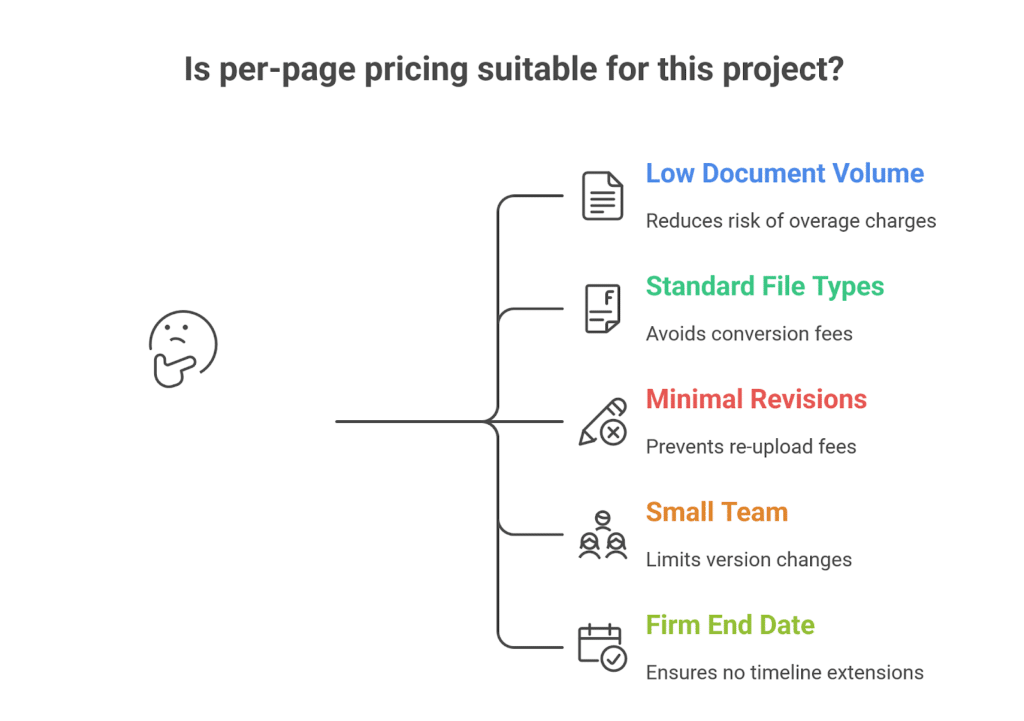
Conditions Where Per-Page Pricing Can Work
- Your document volume is low and easy to estimate.
- Most files are standard text documents like PDFs or Word files.
- You expect little or no revision work.
- Your team is small, limiting re-uploads and version changes.
- Your project has a firm end date with no expected timeline extensions.
These conditions reduce the risk of overage charges, re-upload fees, and page inflation caused by file conversions.
Why These Conditions Matter
Per-page pricing becomes unpredictable when documents grow or change. A single Excel sheet can convert into dozens of pages, and a scanned file can count as special media. Each upload or updated version increases your total cost. If your project does not involve these risks, the model can remain manageable.
Short projects also stay safer because many providers charge full-rate extensions when timelines run long. If you know your access period won’t change, you avoid this added cost.
Warning Signs That Per-Page Pricing Is Not Safe
Per-page pricing becomes risky when your project has moving parts. If you see any of the signs below, your final bill may be much higher than expected:
- You don’t know your exact document volume.
- Your team relies on large Excel spreadsheets or multimedia files.
- You expect frequent revisions or re-uploads.
- Your deal might extend beyond the initial schedule.
- Many users need to upload or update documents.
These conditions increase the chances of page inflation, special media charges, and time-based overages.
A Simple Checklist
| Safe for Per-Page Pricing | Not Safe for Per-Page Pricing |
| Mostly text-based files | Mixed media or scans |
| Low document volume | Unclear or growing data volume |
| Few or no revisions | Frequent updates or re-uploads |
| Short, fixed timeline | Extended or unpredictable timeline |
| Small internal team | Many collaborators or external partners |
If most of your project falls into the right column, you should avoid per-page pricing.
What to Do If Your Project Isn’t a Good Fit
If your project involves uncertainty, growth, or heavy collaboration, look at alternatives such as:
- Flat rate pricing
- Flat monthly fee plans
- Transparent pricing structure with unlimited users and storage
These models remove page-based risk and make your costs predictable, especially for due diligence or multiple deals.
Buyer’s Guide, What to Ask (and Negotiate) Before Locking in a VDR Quote
Choosing a virtual data room isn’t just about comparing prices. You need to understand how each pricing model works, what counts toward your bill, and how the provider handles storage, re-uploads, and project extensions. Clear questions upfront help you avoid hidden fees and make an informed decision.
Key Questions to Ask the Vendor
You should ask every provider the same core questions so you can compare their offers fairly.
1. How do you define a “page”?
Different virtual data room providers convert files in different ways. Ask whether they count:
- Excel spreadsheets
- PowerPoints
- Scanned documents
- Images or multimedia files
This matters because these files often inflate page counts and raise your total cost.
2. What is your policy on versioning and re-uploads?
Some providers charge each time you upload a new version. If your deal requires ongoing updates, this can create major hidden costs.
3. Do you charge extra for media or special file types?
If your project includes audio files, videos, long presentations, or high-resolution images, confirm whether these trigger higher rates.
4. What happens if my deal runs longer?
Many providers do not prorate extended access. You need to know:
- How time-based overages are billed
- Whether extended timelines require a full extra month of service
5. Can I see my page count in real time?
A transparent pricing structure helps you control cost. If you can’t see page counts as you upload, you risk bill shock at the end.
Internal Preparation Before You Request Pricing
Before you compare quotes, get clear on your own needs. This prevents underestimating your data volume and helps you choose the right data room edition or pricing structure.
Know your:
- Expected document volume
- File types (PDFs, Excel, images, multimedia files)
- Number of users
- Length of the project
- Expected revision activity
If you expect many uploads, consider converting or organizing your files first. Clean, structured files reduce unexpected charges in usage-based pricing and avoid inflated page counts.
Practical Ways to Lower Your Cost
You can reduce your virtual data room pricing by preparing your documents and avoiding unnecessary uploads. Here are a few strategies that actually matter:
- Keep files final before uploading to reduce re-uploads.
- Convert images or scans into text-based PDFs when possible.
- Limit who can upload documents to avoid accidental changes.
These steps help you avoid additional cost and keep your total price predictable.
Ask for Alternative Pricing Models
If you’re not sure per-page pricing fits your project, ask the provider for options such as:
- Flat rate pricing
- Flat monthly fee
- Per-user pricing
- Storage-based pricing
- Custom pricing
Flat-rate plans normally include unlimited users, a set amount of storage space, and no surprise overage fees. These models deliver more predictable costs for deals with unclear or growing document volume.
Sample Comparison Table to Help You Negotiate
| Pricing Model | Best For | Main Risk | Notes |
| Per-Page Pricing | Small, fixed document sets | High unexpected costs | $0.40–$1.00 per page; re-uploads billed |
| Per-User Pricing | Small teams | Costs rise with more users | $15–$25 per user per month |
| Storage-Based Pricing | Media-heavy files | High cost per GB | $60–$77 per GB per month |
| Flat Rate Pricing | Most deals | Few risks | Predictable; includes storage + user licenses |
This helps you compare prices easily and choose the model that best fits your due diligence or multiple deal workflows.
When Non–Per-Page Pricing Models Are Better, Consider These Alternatives
Per-page pricing becomes expensive and unpredictable when your document volume grows, your files are mixed, or your team makes frequent updates. In these situations, other pricing models offer clearer costs and fewer risks.
Per-User (Seat-Based) Pricing
Per-user pricing charges a set amount for each user license, usually $15–$25 per user per month. It works well for small teams where only a few people upload or manage documents.
This model is better than per-page pricing when your project does not require many revisions or external reviewers. Costs rise only if you add more users.
Storage-Based Pricing
Storage-based pricing charges for the actual data storage you use. Rates often fall between $60–$77 per GB per month.
This model is stronger than per-page pricing when your deal includes large Excel files, images, scans, audio files, or multimedia files. These file types often explode into high page counts under per-page pricing, but they do not cause the same issue in a storage-based plan.
Flat Rate Pricing / Flat Monthly Fee
Flat-rate pricing is generally the most predictable. Plans often cost $400–$1,000 per month and usually include:
- Unlimited users
- A set storage amount
- No per-page charges
This model is better for most deals, especially when document volume is uncertain or when multiple teams contribute. It removes page conversion fees, re-upload fees, and most hidden costs.
Hybrid or Tiered Pricing
Hybrid plans combine models, such as flat-rate access with storage or user caps. These can be flexible, but you still need to watch for overage charges.
Side-by-Side Comparison
| Pricing Model | Predictability | Main Risk | Best Use Case |
| Per-Page | Low | Page inflation, re-upload fees | Small, fixed document sets |
| Per-User | Medium | Added cost for more users | Small teams |
| Storage-Based | Medium–High | High cost for large storage needs | Media-heavy files |
| Flat Rate | High | Paying for unused storage in tiny projects | Most deals and audits |
| Hybrid | Varies | Overage from caps | Long-term or specialized projects |
Why These Alternatives Often Win
Most deals involve revisions, mixed file types, and changing timelines. These conditions make per-page pricing unpredictable. Non–per-page models avoid page conversion problems and give you a transparent pricing structure you can budget around.
Frequently Asked Questions
1. How Much Does a VDR Cost?
The cost of a virtual data room depends on the pricing model. Per-page pricing usually ranges from $0.40 to $1.00 per page, per-user pricing averages $15–$25 per user per month, storage-based pricing runs $60–$77 per GB, and flat-rate plans generally cost $400–$1,000 per month. For most deals, flat-rate plans offer the most predictable virtual data room costs.
2. Why Are Virtual Data Rooms So Expensive?
Virtual data rooms can be expensive because costs increase with page conversions, re-uploads, multimedia files, added users, and extended deal timelines. Many older providers also use pricing models with hidden fees, overage charges, and page-based billing. Modern VDRs with flat rate pricing and transparent pricing structures help reduce these unexpected costs.
3. How Much Does Datasite Cost Per Page?
Datasite (formerly Merrill DatasiteOne) is known for per-page pricing, and while exact prices are not publicly listed, industry research shows that providers using similar models typically charge $0.40–$1.00 per page, plus potential fees for special media, re-uploads, and timeline extensions. Because Datasite does not publish pricing openly, most buyers must request custom quotes.
Conclusion & Next-Step Checklist, How to Use This Guide for Your Deal or Audit
Per-page pricing only works when your project is small, predictable, and involves simple documents. In most deals, document volume grows, files change, and timelines extend. These shifts raise your page count and lead to higher virtual data room costs, often far above the original estimate. Because of this, many teams get better results with flat rate pricing, flat monthly fee plans, per-user pricing, or storage-based pricing, since these models offer clearer budgets and fewer hidden fees.
If you want to know whether per-page pricing is safe, check your project against a few simple points. It may be acceptable if your document volume is low, your files are mostly text-based, your timeline is fixed, and your team expects very few revisions. If any of these are uncertain, a non–per-page pricing model is usually the safer choice.
Before you choose a data room, clarify what types of files you’ll upload, how many people will upload them, and how long the project may last. Compare pricing across different models, and ask providers direct questions about page counting, re-upload rules, media charges, storage limits, and extension fees. Then choose a VDR with transparent pricing, strong security, easy navigation, and dependable support. These steps help you avoid unexpected costs and keep your due diligence or audit on track.

Patrick Schnepf is the Senior Vice President of Global Sales at SmartRoom, where he leads strategic initiatives to enhance secure file-sharing and collaboration solutions for M&A transactions. With a career spanning over two decades in sales and business development within the technology sector, Patrick has been instrumental in driving SmartRoom’s global revenue growth and expanding its market presence. He is a growth-oriented leader who excels at building go-to-market strategies that accelerate adoption, deepen customer relationships, and business impact.
